Usage
The package is based on a WebSocket client-server interaction. The server waits for connections by the clients. The clients can send configurations messages in JSON format (e.g. to specify the input/output desired language) and audio chunks, encoded as 16-bit integers. The server processes the input audio, generates the transcript/translation by means of the configured speech processor and sends it to the client in JSON format. In addition, if configured to do so, the server writes logs that can be used to compute metrics in a JSONL file.
To have everything up and running, first run the server and once the server is up and running execute one or more clients. The repository contains the code for two types of clients: a web interface client that can be used for demos and a python command-line client that can be used for testing or evaluation of the speech processor performance.
Below, you can find a simple illustration of the overall architecture with the two scenarios:
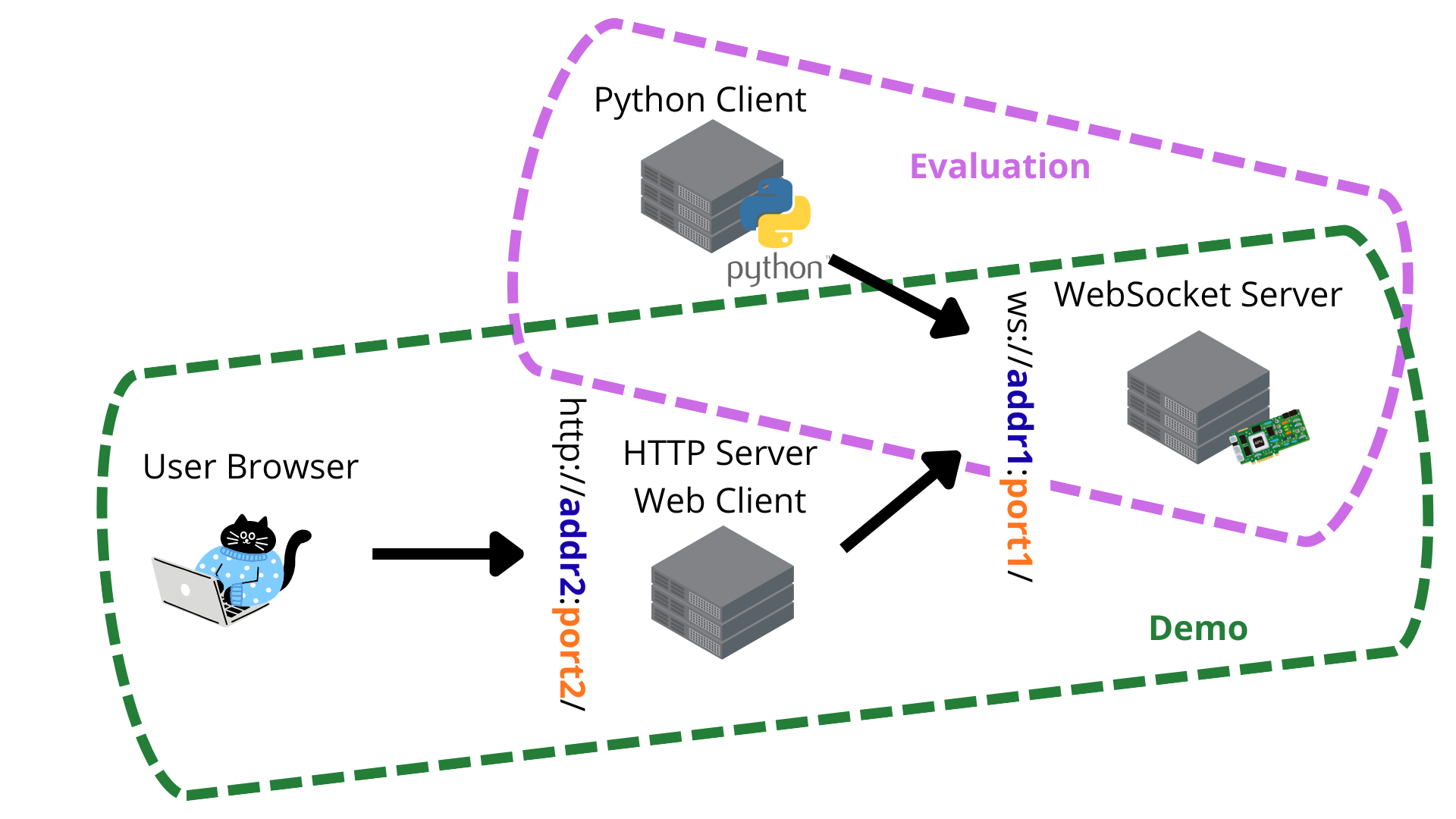
To streamline the evaluation of speech processors in terms of quality and latency, there is also the possibility to run the inference with a configured speech processor without setting up a client-server interaction. For more information, refer to the Evaluation section.
WebSocket Server
Run the WebSocket server with YAML configuration files:
simulstream_server --server-config config/server.yaml \
                   --speech-processor-config config/speech_processor.yaml
The repository contains examples of YAML files both for the server and for some speech processors. They can be edited and adapted.
Customize with Your Speech Processor
If you want to implement your own speech_processor, you need to create a subclass
of simulstream.server.speech_processors.SpeechProcessor and add the class
to the PYTHONPATH. Then reference the new class in the YAML file configuration
of the speech processor. Refer to the dedicated documentation for more
details on how to implement a speech processor in simulstream.server.speech_processors.base.
You can also check the examples of speech processors available in the repository as a reference for your implementation. Notice that each speech processor can have additional dependencies that are not installed by default with this codebase (see Installation).
HTTP Server Web Client
For a demo, you can create an HTTP web server that servers a web interface interacting with the WebSocket server. This can be done by:
simulstream_demo_http_server --config config/server.yaml -p 8001 --directory webdemo
In case you are not running the command from the root folder of this repository, you should change
accordingly the --directory parameter to point to the webdemo folder containing the HTML
files of the HTTP demo. You can of course replace 8001 with any other port number you prefer.
The web interface can then be accessed from the local laptop at http://localhost:8001/ or from
any other terminal connected to the same network using the IP address of your workstation instead
of localhost. Be careful not to use the same port specified for the WebSocket server if they
are running on the same machine. If running the HTTP server from a machine different from the one
where the WebSocket server runs, ensure that the HTTP server can connect to the WebSocket server
through the address specified in the config/server.yaml file.
Python Client
If you want to process a set of audio files (e.g. a test set) with your system, send the audios with the provided client:
simulstream_wavs_client --uri ws://localhost:8080/ \
    --wav-list-file PATH_TO_TXT_FILE_WITH_A_LIST_OF_WAV_FILES.txt \
    --tgt-lang it --src-lang en
Tne --uri should contain the address of the WebSocket client, so it should correspond to what
is specified in the server YAML config. The file specified in --wav-list-file should be a TXT
files containing for each line the path to a WAV file.
Before running the command, ensure that the logging of metrics is enabled in the configuration file
of the WebSocket server (i.e., metrics.enabled = True) and that metrics are logged to an
empty/non-existing file, to ensure that the resulting file will contain only the logs related to
the files sent by the client. Then, compute the relevant scores as described below
(Evaluation).
Evaluation
To evaluate a speech processor, as a first thing you need to run the inference on a test set. This can be done either through the Python client (see section above) or through the dedicated command that performs the inference without setting up a client-server interaction. This second option can be followed by running the dedicated command:
simulstream_inference --speech-processor-config config/speech_processor.yaml \
    --wav-list-file PATH_TO_TXT_FILE_WITH_A_LIST_OF_WAV_FILES.txt \
    --tgt-lang it --src-lang en --metrics-log-file metrics.jsonl
Once you have generated the JSONL file containing the inference log (e.g. metrics.jsonl), you
can score your speech processor by running:
simulstream_score_latency --scorer stream_laal \
    --eval-config config/speech_processor.yaml \
    --log-file metrics.jsonl \
    --reference REFERENCE_FILE.txt \
    --audio-definition YAML_AUDIO_REFERENCES_DEFINITION.yaml

simulstream_score_quality --scorer comet \
    --eval-config config/speech_processor.yaml \
    --log-file metrics.jsonl \
    --references REFERENCES_FILE.txt \
    --transcripts TRANSCRIPTS_FILE.txt

simulstream_stats --eval-config config/speech_processor.yaml \
    --log-file metrics.jsonl
Each of them will output different metrics. simulstream_score_latency provides the metric for
the latency of the system by leveraging a sentence-based TXT reference file and a YAML file, which
for each line in the reference TXT contains the WAV file to which it belong, its offset
(i.e. start time) and duration. The exact definition of how the latency is defined depends on
the selected metric (--scorer).
Similarly, simulstream_score_quality evaluated the quality
of the generated outputs against one (or more) reference (and transcript, only for metrics
requiring them) file(s).
Lastly, simulstream_stats computes statistics like the computational cost and flickering ratio.